You cannot select more than 25 topics
Topics must start with a letter or number, can include dashes ('-') and can be up to 35 characters long.
62 lines
2.6 KiB
Markdown
62 lines
2.6 KiB
Markdown

1 month ago
|
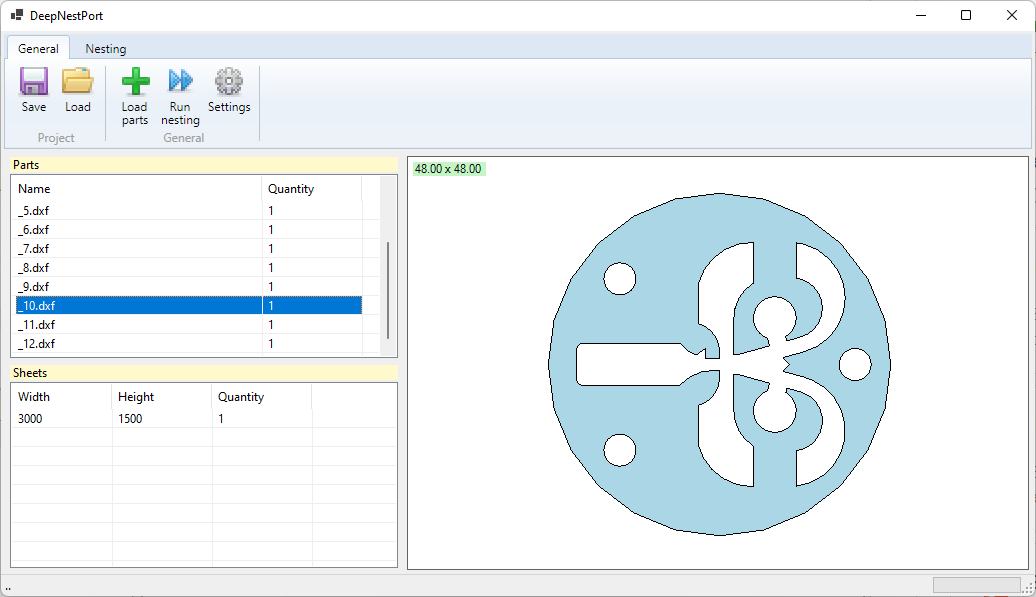
# DeepNestPort
|
||
|
|
DeepNest C# Port (https://github.com/Jack000/Deepnest)
|
||
|
|
|
||
|
|
.Net 6.0 <br/>
|
||
|
|
WinForm / WPF Ribbon panel
|
||
|
|
|
||
|
|
:pencil2: **2D drawer:** Skia (https://github.com/mono/SkiaSharp) <br/>
|
||
|
|
:warning:**Project status:** WIP :construction::construction_worker:
|
||
|
|
|
||
|
|
|
||
|
|
DXF Import: https://github.com/haplokuon/netDxf <br/>
|
||
|
|
DXF Export: https://github.com/IxMilia/Dxf <br/>
|
||
|
|
SVG Import: https://github.com/zHaytam/SvgPathProperties
|
||
|
|
|
||
|
|
Also take a look at the WPF Net.Core version: https://github.com/9swampy/DeepNestSharp
|
||
|
|
|
||
|
|
|
||
|
|

|
||
|
|
|
||
|
|

|
||
|
|
|
||
|
|
## Steps to build and run
|
||
|
|
```
|
||
|
|
1. Open DeepNestPort.Core.sln using Visual Studio
|
||
|
|
2. In visual studio press Build->Build solution, and wait until building
|
||
|
|
3. Run DeepNestPort.Core.exe (can be found here 'DeepNestPort-master\Core\DeepNestPort.Core\bin\Debug\')
|
||
|
|
```
|
||
|
|
|
||
|
|
## (Optional) Running this software using external dll
|
||
|
|
Steps to generate 'minkowski.dll' file:
|
||
|
|
|
||
|
|
1.Install vs2022 and also install plugin named "Desktop development with C++"
|
||
|
|
|
||
|
|
2.Download code.
|
||
|
|
|
||
|
|
3.Download boost zip (https://www.boost.org/users/history/version_1_76_0.html)
|
||
|
|
|
||
|
|
4.Extract it somewhere and copy its location and edit it in DeepNestPort-master\Minkowski\compile.bat file like so :-
|
||
|
|
cl /Ox -I "D:\boost\boost_1_76_0" /LD minkowski.cc
|
||
|
|
|
||
|
|
5.Go to Start->All Programs->(Scroll down to see Visual Studio 2022 folder)->Tools->Dev. Command Prompt
|
||
|
|
Do cd to the place where DeepNestPort-master is location(u might have to do 'cd /d <location>' instead of
|
||
|
|
normal 'cd' command to change the drive)
|
||
|
|
enter 'compile.bat' in command prompt and it will automatically generate a 'minkowski.dll' file for you.
|
||
|
|
|
||
|
|
Steps to generate 'DeepNestPort.exe':
|
||
|
|
|
||
|
|
1. Open vs2022 and open project in explorer(select file 'DeepNestPort.sln').
|
||
|
|
2. In visual studio press Build->Build solution. This will take 10-20 seconds
|
||
|
|
and u will obtain a 'DeepNestPort.exe' in 'DeepNestPort-master\DeepNestPort\bin\Debug\' folder.
|
||
|
|
|
||
|
|
|
||
|
|
To run software just copy minkowski.dll to the folder where u have exe, and u will have this project running.
|
||
|
|
Tudums!
|
||
|
|
|
||
|
|
## Contributors
|
||
|
|
* https://github.com/Daniel-t-1/DeepNestPort (dxf export)
|
||
|
|
* https://github.com/9swampy/DeepNestPort (simplification features)
|
||
|
|
|
||
|
|
|
||
|
|
<sub>Some icons by [Yusuke Kamiyamane](http://p.yusukekamiyamane.com/). Licensed under a [Creative Commons Attribution 3.0 License](http://creativecommons.org/licenses/by/3.0/)</sub>
|